View 体系是 Android 的核心,是非常重要的一环,后面想看看 RecyclerView 的源码,本来自己也对这一块不是很熟练,故跟着学习记录一下。

View 与 ViewGroup

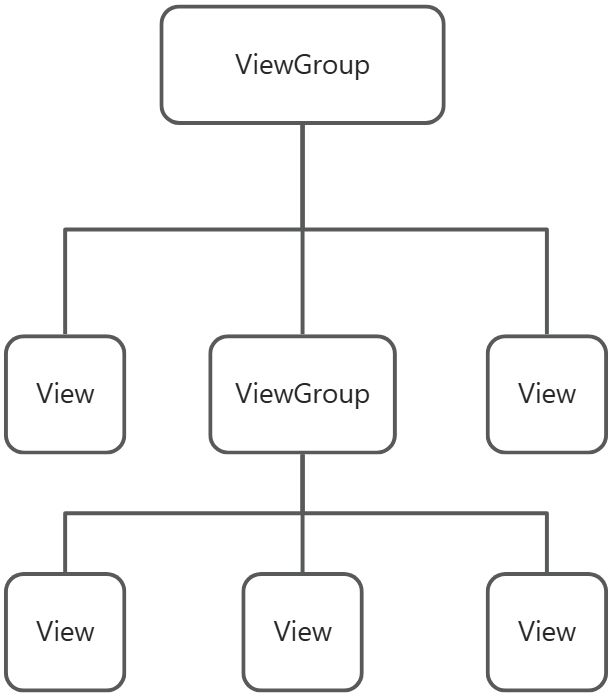
View 是 Android 所有控件的基类,我们平常用的 TextView,ImageView 等等都是继承了 View 这个基类的。而 ViewGroup 可以看作多个 View 的组合,形成了一个 View 树:

image

比如我们常用的 LinearLayout,RelativeLayout 等等都是继承于 ViewGroup 的(注意,ViewGroup 也是继承于 View 的

坐标系

坐标系有两种,分为 Android 坐标系和 View 坐标系,这两种坐标系是不冲突的,我们通过这两种坐标系能帮助我们实现 View 各种操作。

Android 坐标系

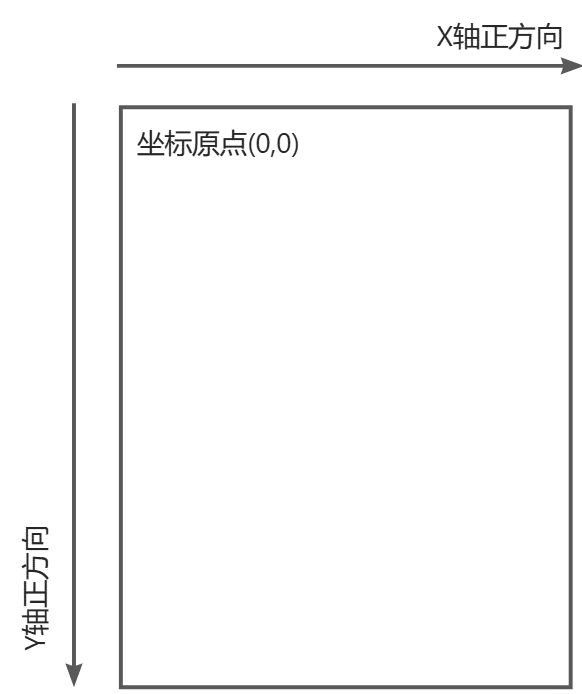
Android ,屏幕左上角为 Android 坐标系的原点,向右为 X 轴正方向,向下为 Y 轴正方向:

我们通过 getRawX(),getRawY()方法获取的都是 Android 坐标系的坐标。

View 坐标系

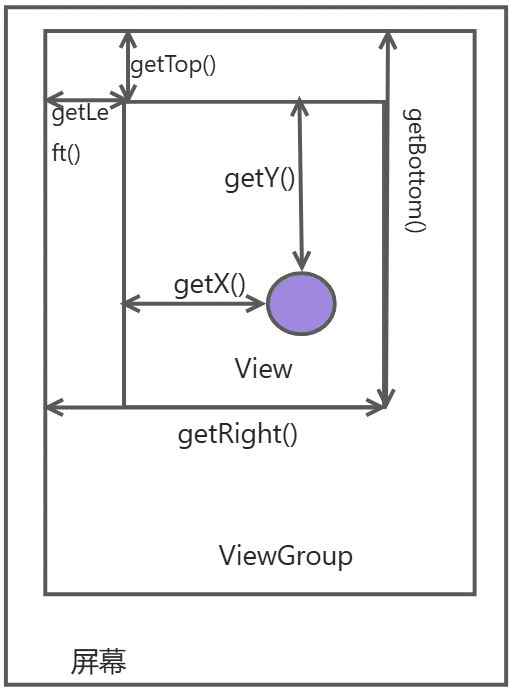
View 坐标系即 View 里面单独的一个坐标系:

  1. View 获取自身宽高

1
2
3
4
5
6
7
8
9
10
width = getRight() - getLeft();
height = getBottom() - getTop();
//这样做很麻烦,系统已经为我们提供了获取宽高的方法
public final int getHeight() {
return mBottom - mTop;
}

public final int getWidth() {
return mRight - mLeft;
}
  1. View 自身坐标

如上图,可以通过 getTop(),getLeft(),getRight(),getBottom()拿到 View 自身到父控件的距离。

  1. MotionEvent 提供的方法

上面的圆点即为触摸点,可以通过 getX(),getY(),getRawX(),getRawY()来获取触摸点的坐标。

View 的工作流程

View 的工作流程就是自定义 View 的核心部分了,分为 measure,layout,draw 三个部分。顾名思义,measure 就是用来测量 View 的宽高,layout 用来确定 View 的位置,draw 用来绘制 View。

View 的工作流程入口

我们知道一个 Activity 里面有个 window,而 DecorView 会被加载到这个 window 中,那么他是如何被加载进去的呢?

在调用 startActivity()方法时,可以追溯到 ActivityThread 的 handleLaunchActivity()方法,这里会调用一个 handleResumeActivity()方法,我们来看一下代码:

1
2
3
4
5
6
7
8
9
10
11
12
13
14
15
16
17
18
19
20
21
22
23
24
25
26
27
28
29
30
31
32
33
34
35
36
37
38
39
40
41
42
43
44
45
46
47
48
49
50
51
@Override
public void handleResumeActivity(ActivityClientRecord r, boolean finalStateRequest,
boolean isForward, boolean shouldSendCompatFakeFocus, String reason) {
// If we are getting ready to gc after going to the background, well
// we are back active so skip it.
unscheduleGcIdler();
mSomeActivitiesChanged = true;

// TODO Push resumeArgs into the activity for consideration
// skip below steps for double-resume and r.mFinish = true case.
if (!performResumeActivity(r, finalStateRequest, reason)) {
return;
}
...
// 重点
if (r.window == null && !a.mFinished && willBeVisible) {
r.window = r.activity.getWindow();
View decor = r.window.getDecorView();
decor.setVisibility(View.INVISIBLE);
ViewManager wm = a.getWindowManager();
WindowManager.LayoutParams l = r.window.getAttributes();
a.mDecor = decor;
l.type = WindowManager.LayoutParams.TYPE_BASE_APPLICATION;
l.softInputMode |= forwardBit;
if (r.mPreserveWindow) {
a.mWindowAdded = true;
r.mPreserveWindow = false;
// Normally the ViewRoot sets up callbacks with the Activity
// in addView->ViewRootImpl#setView. If we are instead reusing
// the decor view we have to notify the view root that the
// callbacks may have changed.
ViewRootImpl impl = decor.getViewRootImpl();
if (impl != null) {
impl.notifyChildRebuilt();
}
}
if (a.mVisibleFromClient) {
if (!a.mWindowAdded) {
a.mWindowAdded = true;
wm.addView(decor, l); // 这里调用了WindowManager的addView()方法
} else {
// The activity will get a callback for this {@link LayoutParams} change
// earlier. However, at that time the decor will not be set (this is set
// in this method), so no action will be taken. This call ensures the
// callback occurs with the decor set.
a.onWindowAttributesChanged(l);
}
}
}
...
}

我们可以发现,这里会得到 DecorView 以及 WindowManager,WindowManager 是一个接口并继承了接口 ViewManager,然后呢我们看一下这里的 addView()方法(这里 wm 的实现类是 WindowManagerImpl):

1
2
3
4
5
6
@Override
public void addView(@NonNull View view, @NonNull ViewGroup.LayoutParams params) {
applyTokens(params);
mGlobal.addView(view, params, mContext.getDisplayNoVerify(), mParentWindow,
mContext.getUserId());
}

我们继续跟踪这个 mGlobal 的 addView() 方法:

1
2
3
4
5
6
7
8
9
10
11
12
13
14
15
16
17
18
19
20
21
22
23
24
25
26
27
28
29
30
31
32
33
34
35
36
public void addView(View view, ViewGroup.LayoutParams params,
Display display, Window parentWindow, int userId) {
...

ViewRootImpl root;
View panelParentView = null;

synchronized (mLock) {
...

if (windowlessSession == null) {
root = new ViewRootImpl(view.getContext(), display);// 1
} else {
root = new ViewRootImpl(view.getContext(), display,
windowlessSession, new WindowlessWindowLayout());
}

view.setLayoutParams(wparams);

mViews.add(view);
mRoots.add(root);
mParams.add(wparams);

// do this last because it fires off messages to start doing things
try {
root.setView(view, wparams, panelParentView, userId);// 2
} catch (RuntimeException e) {
final int viewIndex = (index >= 0) ? index : (mViews.size() - 1);
// BadTokenException or InvalidDisplayException, clean up.
if (viewIndex >= 0) {
removeViewLocked(viewIndex, true);
}
throw e;
}
}
}

可以看到注释 1 的地方创建了一个 ViewRootImpl 的实例,然后在注释 2 的地方调用了 setView()方法并将 DecorView 传进去,这样就把 DecorView 加载到了 window 中。

View 的 measure 流程

MeasureSpec

MeasureSpec 是 View 的一个内部类,里面封装了一个 View 的规格尺寸。在 Measure 流程中,系统会将 View 的 LayoutParams 根据父容器所施加的规则转换成对应的 MeasureSpec,在 onMeasure 方法中根据这个 MeasureSpec 来确定 View 的宽高。

1
2
3
4
5
6
7
8
9
10
11
12
13
14
15
16
17
18
19
20
21
22
23
24
25
26
27
28
29
30
31
32
33
34
35
36
37
38
39
40
41
42
43
44
45
46
47
48
49
50
51
52
53
54
55
56
57
58
59
60
61
62
63
64
65
66
67
public static class MeasureSpec {
private static final int MODE_SHIFT = 30;
private static final int MODE_MASK = 0x3 << MODE_SHIFT;

@IntDef({UNSPECIFIED, EXACTLY, AT_MOST})
@Retention(RetentionPolicy.SOURCE)
public @interface MeasureSpecMode {}

public static final int UNSPECIFIED = 0 << MODE_SHIFT;

public static final int EXACTLY = 1 << MODE_SHIFT;

public static final int AT_MOST = 2 << MODE_SHIFT;

@UnsupportedAppUsage
public static int makeSafeMeasureSpec(int size, int mode) {
if (sUseZeroUnspecifiedMeasureSpec && mode == UNSPECIFIED) {
return 0;
}
return makeMeasureSpec(size, mode);
}

@MeasureSpecMode
public static int getMode(int measureSpec) {
//noinspection ResourceType
return (measureSpec & MODE_MASK);
}

public static int getSize(int measureSpec) {
return (measureSpec & ~MODE_MASK);
}

static int adjust(int measureSpec, int delta) {
final int mode = getMode(measureSpec);
int size = getSize(measureSpec);
if (mode == UNSPECIFIED) {
// No need to adjust size for UNSPECIFIED mode.
return makeMeasureSpec(size, UNSPECIFIED);
}
size += delta;
if (size < 0) {
Log.e(VIEW_LOG_TAG, "MeasureSpec.adjust: new size would be negative! (" + size +
") spec: " + toString(measureSpec) + " delta: " + delta);
size = 0;
}
return makeMeasureSpec(size, mode);
}

public static String toString(int measureSpec) {
int mode = getMode(measureSpec);
int size = getSize(measureSpec);

StringBuilder sb = new StringBuilder("MeasureSpec: ");

if (mode == UNSPECIFIED)
sb.append("UNSPECIFIED ");
else if (mode == EXACTLY)
sb.append("EXACTLY ");
else if (mode == AT_MOST)
sb.append("AT_MOST ");
else
sb.append(mode).append(" ");

sb.append(size);
return sb.toString();
}
}

可以看出 MeasureSpec 的常量代表了 32 位的 int 值,高 2 位是 specMode,低 30 位则是 specSize。specMode 是测量模式,而 specSize 则是测量大小,specMode 有三种模式:

  • UNSPECIFIED: 未指定模式,不做限制。

  • AT_MOST:最大模式,相当于 wrap_content。子 View 最终大小是父 View 指定的 specSize 值,且不能超过这个值。

  • EXACTLY: 精确模式,相当于 match_parent 和具体值,父容器测出 View 所需大小,也就是 specSize 的值。

对于每一个 View,他的 MeasureSpec 保存了 View 的尺寸规格。在测量流程中,通过 makeMeasureSpec 保存宽高信息,getMode/getSize 得到模式和他的宽高。

View 的 measure 流程

先看一下 View 的 onMeasure 方法:

1
2
3
4
protected void onMeasure(int widthMeasureSpec, int heightMeasureSpec) {
setMeasuredDimension(getDefaultSize(getSuggestedMinimumWidth(), widthMeasureSpec),
getDefaultSize(getSuggestedMinimumHeight(), heightMeasureSpec));
}

继续跟进:

1
2
3
4
5
6
7
8
9
10
11
12
protected final void setMeasuredDimension(int measuredWidth, int measuredHeight) {
boolean optical = isLayoutModeOptical(this);
if (optical != isLayoutModeOptical(mParent)) {
Insets insets = getOpticalInsets();
int opticalWidth = insets.left + insets.right;
int opticalHeight = insets.top + insets.bottom;

measuredWidth += optical ? opticalWidth : -opticalWidth;
measuredHeight += optical ? opticalHeight : -opticalHeight;
}
setMeasuredDimensionRaw(measuredWidth, measuredHeight);
}

这个方法就是用来设置宽高的,我们看一下 getDefaultSize()这个方法:

1
2
3
4
5
6
7
8
9
10
11
12
13
14
15
16
public static int getDefaultSize(int size, int measureSpec) {
int result = size;
int specMode = MeasureSpec.getMode(measureSpec);
int specSize = MeasureSpec.getSize(measureSpec);

switch (specMode) {
case MeasureSpec.UNSPECIFIED:
result = size;
break;
case MeasureSpec.AT_MOST:
case MeasureSpec.EXACTLY:
result = specSize;
break;
}
return result;
}

specMode 是 View 的测量模式,而 specSize 是 View 的测量大小,这里就是根据不同的 specMode 返回不同的 result,在 AT_MOST 和 EXACTLY 模式下,是会直接 return 这个 specSize 值,所以如果我们继承 View 的自定义 View 的话,wrap_content 和 match_parent 效果是一样的,如果想实现 wrap_content,则需要自己重写 onMeasure 方法,。在 UNSPECIFIED 模式下返回的是 getSuggestedMinimumWidth(),我们看一下这个方法:

1
2
3
protected int getSuggestedMinimumWidth() {
return (mBackground == null) ? mMinWidth : max(mMinWidth, mBackground.getMinimumWidth());
}

就是如果背景为空则取 mMinWidth,否则取 mMinWidth 和 mBackground 这个背景的最小宽度。

mMinWidth 可以用 setMinimumWidth()方法设置。

ViewGroup 的 measure 流程

对于 ViewGroup 来说,它不只要测量自身,还要遍历地调用子元素的 measure 方法。ViewGroup 中没有定义 onMeasure 方法,但定义了 measureChildren 方法:

1
2
3
4
5
6
7
8
9
10
protected void measureChildren(int widthMeasureSpec, int heightMeasureSpec) {
final int size = mChildrenCount;
final View[] children = mChildren;
for (int i = 0; i < size; ++i) {
final View child = children[i];
if ((child.mViewFlags & VISIBILITY_MASK) != GONE) {
measureChild(child, widthMeasureSpec, heightMeasureSpec);
}
}
}

这里就是遍历子元素然后调用 measureChild()方法,具体看一下这个方法:

1
2
3
4
5
6
7
8
9
10
11
protected void measureChild(View child, int parentWidthMeasureSpec,
int parentHeightMeasureSpec) {
final LayoutParams lp = child.getLayoutParams();

final int childWidthMeasureSpec = getChildMeasureSpec(parentWidthMeasureSpec,
mPaddingLeft + mPaddingRight, lp.width);
final int childHeightMeasureSpec = getChildMeasureSpec(parentHeightMeasureSpec,
mPaddingTop + mPaddingBottom, lp.height);

child.measure(childWidthMeasureSpec, childHeightMeasureSpec);
}

这里先调用获取了子元素的 LayoutParams 属性,然后获取了子元素的 MeasureSpec 并调用 measure 方法进行测量。看一下 getChildMeasureSpec 方法:

1
2
3
4
5
6
7
8
9
10
11
12
13
14
15
16
17
18
19
20
21
22
23
24
25
26
27
28
29
30
31
32
33
34
35
36
37
38
39
40
41
42
43
44
45
46
47
48
49
50
51
52
53
54
55
56
57
58
59
60
61
62
63
64
65
66
67
68
69
public static int getChildMeasureSpec(int spec, int padding, int childDimension) {
int specMode = MeasureSpec.getMode(spec);
int specSize = MeasureSpec.getSize(spec);

int size = Math.max(0, specSize - padding);

int resultSize = 0;
int resultMode = 0;

switch (specMode) {
// Parent has imposed an exact size on us
case MeasureSpec.EXACTLY:
if (childDimension >= 0) {
resultSize = childDimension;
resultMode = MeasureSpec.EXACTLY;
} else if (childDimension == LayoutParams.MATCH_PARENT) {
// Child wants to be our size. So be it.
resultSize = size;
resultMode = MeasureSpec.EXACTLY;
} else if (childDimension == LayoutParams.WRAP_CONTENT) {
// Child wants to determine its own size. It can't be
// bigger than us.
resultSize = size;
resultMode = MeasureSpec.AT_MOST;
}
break;

// Parent has imposed a maximum size on us
case MeasureSpec.AT_MOST:
if (childDimension >= 0) {
// Child wants a specific size... so be it
resultSize = childDimension;
resultMode = MeasureSpec.EXACTLY;
} else if (childDimension == LayoutParams.MATCH_PARENT) {
// Child wants to be our size, but our size is not fixed.
// Constrain child to not be bigger than us.
resultSize = size;
resultMode = MeasureSpec.AT_MOST;
} else if (childDimension == LayoutParams.WRAP_CONTENT) {
// Child wants to determine its own size. It can't be
// bigger than us.
resultSize = size;
resultMode = MeasureSpec.AT_MOST;
}
break;

// Parent asked to see how big we want to be
case MeasureSpec.UNSPECIFIED:
if (childDimension >= 0) {
// Child wants a specific size... let them have it
resultSize = childDimension;
resultMode = MeasureSpec.EXACTLY;
} else if (childDimension == LayoutParams.MATCH_PARENT) {
// Child wants to be our size... find out how big it should
// be
resultSize = View.sUseZeroUnspecifiedMeasureSpec ? 0 : size;
resultMode = MeasureSpec.UNSPECIFIED;
} else if (childDimension == LayoutParams.WRAP_CONTENT) {
// Child wants to determine its own size.... find out how
// big it should be
resultSize = View.sUseZeroUnspecifiedMeasureSpec ? 0 : size;
resultMode = MeasureSpec.UNSPECIFIED;
}
break;
}
//noinspection ResourceType
return MeasureSpec.makeMeasureSpec(resultSize, resultMode);
}

这里就是根据父容器的 MeasureSpec 模式再结合子元素的 LayoutParams 来得到子元素自己的 MeasureSpec。

ViewGroup 自身并没有实现 onMeasure()方法,而是让子类根据不同的需求自己实现。以 LinearLayout 为例:

1
2
3
4
5
6
7
8
@Override
protected void onMeasure(int widthMeasureSpec, int heightMeasureSpec) {
if (mOrientation == VERTICAL) {
measureVertical(widthMeasureSpec, heightMeasureSpec);
} else {
measureHorizontal(widthMeasureSpec, heightMeasureSpec);
}
}

很明显是根据垂直方向还是水平方向进行不同的测量,以垂直方向的 Vertical 测量为例:

1
2
3
4
5
6
7
8
9
10
11
12
13
14
15
16
17
18
19
20
21
22
23
24
25
26
27
28
29
30
31
32
33
34
35
36
37
38
39
40
41
42
43
44
45
46
47
48
49
50
51
52
53
54
55
56
57
58
59
60
61
62
63
64
65
66
67
68
69
70
71
72
73
74
75
76
77
78
79
80
81
82
83
84
85
86
87
88
89
90
91
92
93
94
95
96
97
98
99
100
101
102
103
104
105
106
107
108
109
110
111
112
113
114
115
116
117
118
119
120
121
122
123
124
125
126
127
128
129
130
131
132
133
134
135
136
137
138
139
140
141
142
143
144
145
146
147
148
149
150
151
152
153
154
155
156
157
158
159
160
161
162
163
164
165
166
167
168
169
170
171
172
173
174
175
176
177
178
179
180
181
182
183
184
185
186
187
188
189
190
191
192
193
194
195
196
197
198
199
200
201
202
203
204
205
206
207
208
209
210
211
212
213
214
215
216
217
218
219
220
221
222
223
224
225
226
227
228
229
230
231
232
233
234
235
236
237
238
239
240
241
242
243
244
245
246
247
248
249
250
251
252
253
254
255
256
257
258
259
260
261
262
void measureVertical(int widthMeasureSpec, int heightMeasureSpec) {
mTotalLength = 0;
int maxWidth = 0;
int childState = 0;
int alternativeMaxWidth = 0;
int weightedMaxWidth = 0;
boolean allFillParent = true;
float totalWeight = 0;

final int count = getVirtualChildCount();

final int widthMode = MeasureSpec.getMode(widthMeasureSpec);
final int heightMode = MeasureSpec.getMode(heightMeasureSpec);

boolean matchWidth = false;
boolean skippedMeasure = false;

final int baselineChildIndex = mBaselineAlignedChildIndex;
final boolean useLargestChild = mUseLargestChild;

int largestChildHeight = Integer.MIN_VALUE;
int consumedExcessSpace = 0;

int nonSkippedChildCount = 0;

// See how tall everyone is. Also remember max width.
for (int i = 0; i < count; ++i) {
final View child = getVirtualChildAt(i);
if (child == null) {
mTotalLength += measureNullChild(i);
continue;
}

if (child.getVisibility() == View.GONE) {
i += getChildrenSkipCount(child, i);
continue;
}

nonSkippedChildCount++;
if (hasDividerBeforeChildAt(i)) {
mTotalLength += mDividerHeight;
}

final LayoutParams lp = (LayoutParams) child.getLayoutParams();

totalWeight += lp.weight;

final boolean useExcessSpace = lp.height == 0 && lp.weight > 0;
if (heightMode == MeasureSpec.EXACTLY && useExcessSpace) {

final int totalLength = mTotalLength;
mTotalLength = Math.max(totalLength, totalLength + lp.topMargin + lp.bottomMargin);
skippedMeasure = true;
} else {
if (useExcessSpace) {

lp.height = LayoutParams.WRAP_CONTENT;
}

final int usedHeight = totalWeight == 0 ? mTotalLength : 0;
measureChildBeforeLayout(child, i, widthMeasureSpec, 0,
heightMeasureSpec, usedHeight);

final int childHeight = child.getMeasuredHeight();
if (useExcessSpace) {
lp.height = 0;
consumedExcessSpace += childHeight;
}

final int totalLength = mTotalLength;
mTotalLength = Math.max(totalLength, totalLength + childHeight + lp.topMargin +
lp.bottomMargin + getNextLocationOffset(child));

if (useLargestChild) {
largestChildHeight = Math.max(childHeight, largestChildHeight);
}
}

if ((baselineChildIndex >= 0) && (baselineChildIndex == i + 1)) {
mBaselineChildTop = mTotalLength;
}

if (i < baselineChildIndex && lp.weight > 0) {
throw new RuntimeException("A child of LinearLayout with index "
+ "less than mBaselineAlignedChildIndex has weight > 0, which "
+ "won't work. Either remove the weight, or don't set "
+ "mBaselineAlignedChildIndex.");
}

boolean matchWidthLocally = false;
if (widthMode != MeasureSpec.EXACTLY && lp.width == LayoutParams.MATCH_PARENT) {
matchWidth = true;
matchWidthLocally = true;
}

final int margin = lp.leftMargin + lp.rightMargin;
final int measuredWidth = child.getMeasuredWidth() + margin;
maxWidth = Math.max(maxWidth, measuredWidth);
childState = combineMeasuredStates(childState, child.getMeasuredState());

allFillParent = allFillParent && lp.width == LayoutParams.MATCH_PARENT;
if (lp.weight > 0) {
weightedMaxWidth = Math.max(weightedMaxWidth,
matchWidthLocally ? margin : measuredWidth);
} else {
alternativeMaxWidth = Math.max(alternativeMaxWidth,
matchWidthLocally ? margin : measuredWidth);
}

i += getChildrenSkipCount(child, i);
}

if (nonSkippedChildCount > 0 && hasDividerBeforeChildAt(count)) {
mTotalLength += mDividerHeight;
}

if (useLargestChild &&
(heightMode == MeasureSpec.AT_MOST || heightMode == MeasureSpec.UNSPECIFIED)) {
mTotalLength = 0;

for (int i = 0; i < count; ++i) {
final View child = getVirtualChildAt(i);
if (child == null) {
mTotalLength += measureNullChild(i);
continue;
}

if (child.getVisibility() == GONE) {
i += getChildrenSkipCount(child, i);
continue;
}

final LinearLayout.LayoutParams lp = (LinearLayout.LayoutParams)
child.getLayoutParams();
// Account for negative margins
final int totalLength = mTotalLength;
mTotalLength = Math.max(totalLength, totalLength + largestChildHeight +
lp.topMargin + lp.bottomMargin + getNextLocationOffset(child));
}
}

// Add in our padding
mTotalLength += mPaddingTop + mPaddingBottom;

int heightSize = mTotalLength;

heightSize = Math.max(heightSize, getSuggestedMinimumHeight());

int heightSizeAndState = resolveSizeAndState(heightSize, heightMeasureSpec, 0);
heightSize = heightSizeAndState & MEASURED_SIZE_MASK;

int remainingExcess = heightSize - mTotalLength
+ (mAllowInconsistentMeasurement ? 0 : consumedExcessSpace);
if (skippedMeasure
|| ((sRemeasureWeightedChildren || remainingExcess != 0) && totalWeight > 0.0f)) {
float remainingWeightSum = mWeightSum > 0.0f ? mWeightSum : totalWeight;

mTotalLength = 0;

for (int i = 0; i < count; ++i) {
final View child = getVirtualChildAt(i);
if (child == null || child.getVisibility() == View.GONE) {
continue;
}

final LayoutParams lp = (LayoutParams) child.getLayoutParams();
final float childWeight = lp.weight;
if (childWeight > 0) {
final int share = (int) (childWeight * remainingExcess / remainingWeightSum);
remainingExcess -= share;
remainingWeightSum -= childWeight;

final int childHeight;
if (mUseLargestChild && heightMode != MeasureSpec.EXACTLY) {
childHeight = largestChildHeight;
} else if (lp.height == 0 && (!mAllowInconsistentMeasurement
|| heightMode == MeasureSpec.EXACTLY)) {
// This child needs to be laid out from scratch using
// only its share of excess space.
childHeight = share;
} else {
// This child had some intrinsic height to which we
// need to add its share of excess space.
childHeight = child.getMeasuredHeight() + share;
}

final int childHeightMeasureSpec = MeasureSpec.makeMeasureSpec(
Math.max(0, childHeight), MeasureSpec.EXACTLY);
final int childWidthMeasureSpec = getChildMeasureSpec(widthMeasureSpec,
mPaddingLeft + mPaddingRight + lp.leftMargin + lp.rightMargin,
lp.width);
child.measure(childWidthMeasureSpec, childHeightMeasureSpec);

// Child may now not fit in vertical dimension.
childState = combineMeasuredStates(childState, child.getMeasuredState()
& (MEASURED_STATE_MASK>>MEASURED_HEIGHT_STATE_SHIFT));
}

final int margin = lp.leftMargin + lp.rightMargin;
final int measuredWidth = child.getMeasuredWidth() + margin;
maxWidth = Math.max(maxWidth, measuredWidth);

boolean matchWidthLocally = widthMode != MeasureSpec.EXACTLY &&
lp.width == LayoutParams.MATCH_PARENT;

alternativeMaxWidth = Math.max(alternativeMaxWidth,
matchWidthLocally ? margin : measuredWidth);

allFillParent = allFillParent && lp.width == LayoutParams.MATCH_PARENT;

final int totalLength = mTotalLength;
mTotalLength = Math.max(totalLength, totalLength + child.getMeasuredHeight() +
lp.topMargin + lp.bottomMargin + getNextLocationOffset(child));
}

// Add in our padding
mTotalLength += mPaddingTop + mPaddingBottom;
// TODO: Should we recompute the heightSpec based on the new total length?
} else {
alternativeMaxWidth = Math.max(alternativeMaxWidth,
weightedMaxWidth);


// We have no limit, so make all weighted views as tall as the largest child.
// Children will have already been measured once.
if (useLargestChild && heightMode != MeasureSpec.EXACTLY) {
for (int i = 0; i < count; i++) {
final View child = getVirtualChildAt(i);
if (child == null || child.getVisibility() == View.GONE) {
continue;
}

final LinearLayout.LayoutParams lp =
(LinearLayout.LayoutParams) child.getLayoutParams();

float childExtra = lp.weight;
if (childExtra > 0) {
child.measure(
MeasureSpec.makeMeasureSpec(child.getMeasuredWidth(),
MeasureSpec.EXACTLY),
MeasureSpec.makeMeasureSpec(largestChildHeight,
MeasureSpec.EXACTLY));
}
}
}
}

if (!allFillParent && widthMode != MeasureSpec.EXACTLY) {
maxWidth = alternativeMaxWidth;
}

maxWidth += mPaddingLeft + mPaddingRight;

maxWidth = Math.max(maxWidth, getSuggestedMinimumWidth());

setMeasuredDimension(resolveSizeAndState(maxWidth, widthMeasureSpec, childState),
heightSizeAndState);

if (matchWidth) {
forceUniformWidth(count, heightMeasureSpec);
}
}

大概就是遍历子元素的 MeasureSpec 并获取高度,然后和 margin 的垂直高度一起加到 mTotalLength 里面。如果位 MATCH_PARENT,则和 View 的 measure 流程是一样的。

View 的 layout 流程

layout 是用来确定自身的位置。ViewGroup 中的 layout 方法用来确定子元素的位置,View 中的 layout 方法用来确定自己的位置:

1
2
3
4
5
6
7
8
9
10
11
12
13
14
15
16
17
18
19
20
21
22
23
24
25
26
27
28
29
30
31
32
33
34
35
36
37
38
39
40
41
42
43
44
45
46
47
48
49
50
51
52
53
54
55
56
57
58
public void layout(int l, int t, int r, int b) {
if ((mPrivateFlags3 & PFLAG3_MEASURE_NEEDED_BEFORE_LAYOUT) != 0) {
if (isTraversalTracingEnabled()) {
Trace.beginSection(mTracingStrings.onMeasureBeforeLayout);
}
onMeasure(mOldWidthMeasureSpec, mOldHeightMeasureSpec);
if (isTraversalTracingEnabled()) {
Trace.endSection();
}
mPrivateFlags3 &= ~PFLAG3_MEASURE_NEEDED_BEFORE_LAYOUT;
}

int oldL = mLeft;
int oldT = mTop;
int oldB = mBottom;
int oldR = mRight;

boolean changed = isLayoutModeOptical(mParent) ?
setOpticalFrame(l, t, r, b) : setFrame(l, t, r, b);

if (changed || (mPrivateFlags & PFLAG_LAYOUT_REQUIRED) == PFLAG_LAYOUT_REQUIRED) {
if (isTraversalTracingEnabled()) {
Trace.beginSection(mTracingStrings.onLayout);
}
onLayout(changed, l, t, r, b);
if (isTraversalTracingEnabled()) {
Trace.endSection();
}

if (shouldDrawRoundScrollbar()) {
if(mRoundScrollbarRenderer == null) {
mRoundScrollbarRenderer = new RoundScrollbarRenderer(this);
}
} else {
mRoundScrollbarRenderer = null;
}

mPrivateFlags &= ~PFLAG_LAYOUT_REQUIRED;

ListenerInfo li = mListenerInfo;
if (li != null && li.mOnLayoutChangeListeners != null) {
ArrayList<OnLayoutChangeListener> listenersCopy =
(ArrayList<OnLayoutChangeListener>)li.mOnLayoutChangeListeners.clone();
int numListeners = listenersCopy.size();
for (int i = 0; i < numListeners; ++i) {
listenersCopy.get(i).onLayoutChange(this, l, t, r, b, oldL, oldT, oldR, oldB);
}
}
}

final boolean wasLayoutValid = isLayoutValid();

mPrivateFlags &= ~PFLAG_FORCE_LAYOUT;
mPrivateFlags3 |= PFLAG3_IS_LAID_OUT;

...
}

l,t,r,b 分别位 View 从左,上,右,下相对于父容器的距离。然后会调用 setFrame 方法,用于初始化 mLeft,mTop,mRight,mBottom4个值,确定了 View 在父容器里面的位置。然后就会调用 onLayout 方法,这个方法是一个空方法,需要我们自己根据不同情况进行确定位置,以 LinearLayout 为例:

1
2
3
4
5
6
7
8
@Override
protected void onLayout(boolean changed, int l, int t, int r, int b) {
if (mOrientation == VERTICAL) {
layoutVertical(l, t, r, b);
} else {
layoutHorizontal(l, t, r, b);
}
}

然后看一下 layoutVertical 方法:

1
2
3
4
5
6
7
8
9
10
11
12
13
14
15
16
17
18
19
20
21
22
23
24
25
26
27
28
29
30
31
32
33
34
35
36
37
38
39
40
41
42
43
44
45
for (int i = 0; i < count; i++) {
final View child = getVirtualChildAt(i);
if (child == null) {
childTop += measureNullChild(i);
} else if (child.getVisibility() != GONE) {
final int childWidth = child.getMeasuredWidth();
final int childHeight = child.getMeasuredHeight();

final LinearLayout.LayoutParams lp =
(LinearLayout.LayoutParams) child.getLayoutParams();

int gravity = lp.gravity;
if (gravity < 0) {
gravity = minorGravity;
}
final int layoutDirection = getLayoutDirection();
final int absoluteGravity = Gravity.getAbsoluteGravity(gravity, layoutDirection);
switch (absoluteGravity & Gravity.HORIZONTAL_GRAVITY_MASK) {
case Gravity.CENTER_HORIZONTAL:
childLeft = paddingLeft + ((childSpace - childWidth) / 2)
+ lp.leftMargin - lp.rightMargin;
break;

case Gravity.RIGHT:
childLeft = childRight - childWidth - lp.rightMargin;
break;

case Gravity.LEFT:
default:
childLeft = paddingLeft + lp.leftMargin;
break;
}

if (hasDividerBeforeChildAt(i)) {
childTop += mDividerHeight;
}

childTop += lp.topMargin;
setChildFrame(child, childLeft, childTop + getLocationOffset(child),
childWidth, childHeight);
childTop += childHeight + lp.bottomMargin + getNextLocationOffset(child);

i += getChildrenSkipCount(child, i);
}
}

这里会调用每个子 view 的 setChildFrame 方法:

1
2
3
private void setChildFrame(View child, int left, int top, int width, int height) {
child.layout(left, top, left + width, top + height);
}

调用子 view 的 layout 方法确定 child 的 位置。

View 的 draw 流程

View 的 draw 流程一共有下面几个步骤:

  1. 如果需要就绘制背景

  2. 保存当前 canvas 层

  3. 绘制 View 的内容

  4. 绘制子 View

  5. 如果需要则绘制 View 的褪色边缘,类似于阴影效果

  6. 绘制装饰,如滚动条。

这里简单看下 3,4几个步骤。

绘制 View 的内容

这里调用了 view 的 onDraw 方法,是一个空实现,需要我们自己去实现,这里也是我们设计自定义 View 非常重要的部分。

绘制子 View

这里调用的是 dispatchDraw 方法,这里也是一个空实现,我们看一下 ViewGroup 的 dispatchDraw 方法。源码很长,在里面主要是循环遍历子 View,调用 drawChild 方法,然后调用子 View 的 draw 方法。